


In the modern era of streaming, YouTube Music has emerged as a colossal platform, offering millions of official songs, rare live performances, remixes, and personalized playlists. It’s a treasure trove for any music fan. However, despite its vast library, the platform comes with significant strings attached for those who want true ownership of their audio.
Whether you want to listen during a commute with spotty service, save on mobile data, or play your favorite tracks on an old MP3 player, the need to download YouTube Music to MP3 is greater than ever. While YouTube Music Premium offers offline listening, it comes with restrictions that lock you into their ecosystem. In this guide, we’ll explore why converting to MP3 is the best solution and how ViWizard Streaming Audio Recorder provides the safest, highest-quality method to liberate your music.
Why Convert YouTube Music to MP3?
You might wonder, “Doesn’t YouTube Music already let me download songs?” The answer is yes, but with major limitations. Converting YouTube Music to MP3 offers several distinct advantages that the official app simply cannot match.
- True Offline Freedom: Official downloads are encrypted and only playable within the YouTube Music app. MP3 files, however, can be played on any device—smartphones, car stereos, smart TVs, gaming consoles, and portable MP3 players—without needing an internet connection or the app.
- Permanent Ownership: If you cancel your YouTube Music Premium subscription, all your downloaded songs disappear. When you download YouTube Music to MP3, the files are yours to keep forever, regardless of your subscription status.
- Universal Compatibility: MP3 is the gold standard for audio. Unlike the protected formats used by streaming services, MP3 files can be used in video editing software, DJ tools, or simply transferred via USB to any device.
- No Data Consumption: Streaming music eats up your mobile data plan. By storing MP3s locally, you can enjoy high-fidelity audio without worrying about data caps or buffering.
The Risks of Free Online Converters
A quick Google search reveals hundreds of “free” YouTube to MP3 converters. While tempting, these tools are often riddled with risks:
- Security Threats: Many free sites are filled with intrusive ads, pop-ups, and malware that can compromise your personal data and computer security.
- Poor Audio Quality: Online converters often rip audio at low bitrates (like 128 kbps or lower), resulting in flat, lifeless sound. They frequently degrade the original quality of the music.
- Missing Metadata: Ever downloaded a track only to find it labeled “Audio-123.mp3” with no artist or album info? Free converters strip away ID3 tags, leaving you with a messy, unorganized music library.
- Unreliable Performance: They often fail on long tracks, have file size limits, or get shut down due to copyright issues, making them inconsistent.
Also Read: How to Download Apple Music Playlist to MP3
The Professional Solution: ViWizard Streaming Audio Recorder
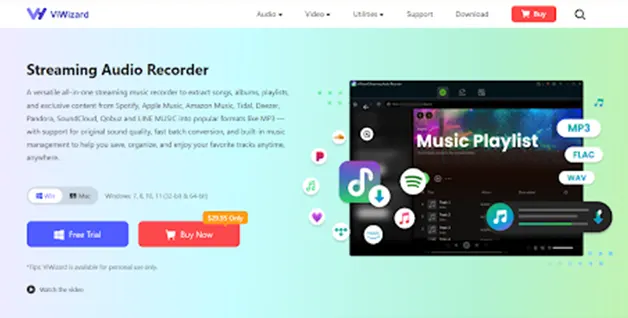
To safely and efficiently download YouTube Music to MP3, you need a dedicated, professional tool. ViWizard Streaming Audio Recorder stands out as the ultimate solution for both Windows and Mac users. Unlike shady web converters, ViWizard is a robust desktop application that records streaming audio directly from the source, ensuring perfect quality and complete data preservation.
ViWizard supports a vast array of platforms beyond YouTube Music, including Spotify, Apple Music, Amazon Music, Tidal, and Deezer, making it an all-in-one tool for building your personal audio library.
Key Features That Make ViWizard the Best Choice
- Lossless Audio Quality: ViWizard captures streaming audio at up to 320 kbps in MP3 format. It preserves the full richness, clarity, and depth of the original track, giving you a listening experience that matches the stream.
- Batch Downloading at 15X Speed: Don’t waste hours downloading songs one by one. ViWizard allows you to queue entire albums or playlists for download. With its 15x faster recording speed, you can convert a massive playlist in a fraction of the time it would take to play it.
- Automatic ID3 Tag Preservation: Say goodbye to messy files. ViWizard automatically fetches and embeds all the crucial metadata—song title, artist, album name, genre, and cover art—directly into the MP3 file. Your music library remains perfectly organized from the moment of download.
- Multiple Output Formats: While MP3 is the most popular choice, ViWizard also supports saving audio as WAV, FLAC, AIFF, and M4A, giving you flexibility for different devices and audiophile needs.
- Safe and Legal for Personal Use: ViWizard functions as a personal audio recorder, operating within legal boundaries for personal, offline listening. It bypasses DRM protection to create a backup of content you have access to, without the security risks of online tools.
Step-by-Step Guide: How to Download YouTube Music to MP3 with ViWizard
Ready to take control of your music? Follow these simple steps to convert your favorite YouTube Music tracks into permanent, high-quality MP3 files.
Step 1: Install ViWizard Streaming Audio Recorder
Download and install the software on your Windows or Mac computer from the official ViWizard website. Launch the program after installation.
Step 2: Set MP3 as the Output Format
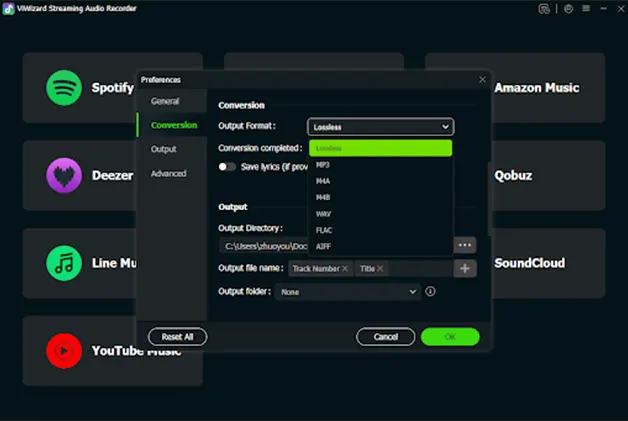
Click on the menu button (usually three lines) in the upper right corner and select Preferences. In the settings window, choose MP3 as the output format. You can also adjust the audio quality (bitrate) here to your preference.
Step 3: Open YouTube Music and Log In
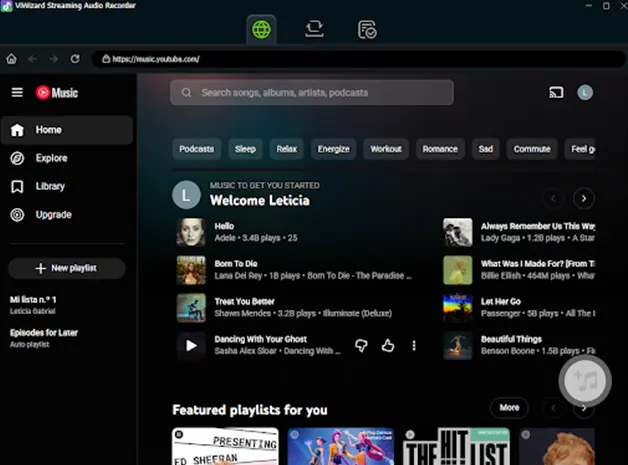
Return to the main interface and select the YouTube Music icon. This will open the YouTube Music web player inside the ViWizard app. Log in to your YouTube Music account to access your library, playlists, and recommendations.
Step 4: Import Your Songs or Playlists
Browse for the song, album, or playlist you wish to download. Once you open the desired content, click the “+” (Add) button to import the tracks into ViWizard. You can repeat this to build a batch download list.
Step 5: Start the Conversion
Navigate to the “Converting” panel and click the big “Convert” button. ViWizard will begin recording the audio streams and converting them to MP3 at high speed. Once finished, you can click the folder icon to locate your new, beautifully tagged MP3 files on your computer, ready to be transferred to any device you own.
Conclusion: Build a Collection That’s Truly Yours
YouTube Music is an incredible discovery engine, but it shouldn’t be the only home for your favorite songs. With ViWizard Streaming Audio Recorder, you can break down the barriers of streaming and build a personal music collection that is permanent, portable, and perfectly organized.
Don’t settle for low-quality, risky online tools. Choose the professional, reliable, and feature-rich solution. Download ViWizard today and transform your streaming experience into a timeless, offline MP3 library. Your music should be as mobile as you are.
Also Read: How Artificial Intelligence Has Changed The Music Streaming Industry?