



Starting a YouTube channel can be exciting, but not everyone wants to show their face on camera. Whether it’s due to privacy concerns, lack of confidence, or simply preferring anonymity, faceless YouTube channels are a great alternative. Thanks to AI avatars, creating engaging content without appearing on screen has never been easier.
In this guide, we’ll explore how to build a successful faceless YouTube channel using AI avatars, with a focus on tools like Pollo AI, which offers an AI avatar feature through its app.
Why Choose a Faceless YouTube Channel?
Faceless YouTube channels have several advantages:
- Privacy & Anonymity – You can create content without revealing your identity.
- Lower Production Barriers – No need for expensive cameras, lighting, or makeup.
- Scalability – AI avatars allow for faster content creation.
- Versatility – Works for niches like finance, tech, storytelling, and more.
How AI Avatars Enhance Faceless Content
AI avatars are digital characters that can speak, emote, and even mimic human gestures. They eliminate the need for a human presenter while keeping the content engaging.
Key Features of a Good AI Avatar Tool:
- Natural Voice & Lip Sync – The avatar should speak naturally with accurate lip movements.
- Customization Options – Ability to change appearance, voice, and background.
- Easy-to-Use Interface – No complex editing skills required.
Also Read: What Are The Best Hours To Post On YouTube
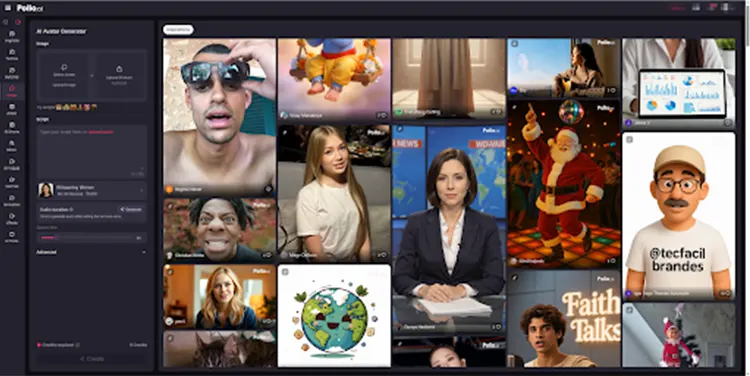
Pollo AI Avatar
One platform that simplifies AI avatar creation is Pollo AI, which offers an AI-powered avatar feature through its app. Here’s how it can help:
- AI-Generated Avatars – Choose from different digital presenters.
- Text-to-Speech – Convert scripts into natural-sounding voiceovers.
- Mobile-Friendly – The Pollo AI app makes it easy to create content on the go.
Steps to Launch a Faceless YouTube Channel with AI Avatars
1. Choose Your Niche
- Pick a topic that doesn’t require a human presenter, such as:
- Finance & Investing (e.g., stock market updates)
- Tech Tutorials (e.g., software guides)
- Motivational Content (e.g., narrated stories)
- Gaming & Entertainment (e.g., game reviews)
2. Write a Script
- Since you won’t be on camera, your script must be clear and engaging. Use tools like ChatGPT or Claude AI to refine your content.
3. Generate Your AI Avatar
- Upload your script to the video creator app and select a presenter. Adjust voice tone, speed, and expressions for a natural feel.
4. Add Visuals & Editing
Pair your AI avatar with:
- Stock footage (from Pexels, Pixabay)
- Screen recordings (for tutorials)
- Animated graphics (using Canva or After Effects)
5. Optimize for YouTube
- SEO-Friendly Titles & Descriptions.
- Engaging Thumbnails – Design thumbnails that grab attention.
- Consistent Upload Schedule – Post regularly to grow your audience.
Best Practices for AI Avatar Channels
- Keep It Natural – Avoid robotic voice tones; adjust speed and pitch.
- Use High-Quality Visuals – Low-res avatars can look unprofessional.
- Engage with Viewers – Respond to comments to build a community.
Faceless YouTube channels powered by AI avatars are a game-changer for creators who prefer anonymity. With tools like Pollo AI’s avatar feature, you can produce high-quality videos without appearing on camera.
The key to success is engaging scripts, professional visuals, and consistent uploads. If you’re ready to start, experiment with different AI tools and find what works best for your channel.